CI Integration Guide
QAClan provides seamless Continuous Integration (CI) Integration, enabling users to automate test execution within their CI/CD pipeline. This ensures test cases run automatically whenever new code changes are pushed, helping to detect defects early and maintain software quality.
Steps to Integrate CI in QAClan
-
Go to the CI Integration section in QAClan.
-
Choose your CI/CD platform (e.g., GitHub, GitLab, etc.).
-
Click Choose Test Cases to select the test cases you want to run in the CI/CD pipeline.
-
Click Generate Code to obtain a pre-configured CI/CD script.
-
Copy and paste the generated script into your CI/CD configuration file (e.g.,
.github/workflows/ci.ymlfor GitHub Actions). -
Ensure the necessary API Key is configured for authentication.
-
Push the changes to your repository. QAClan will trigger the test executions automatically upon each deployment.
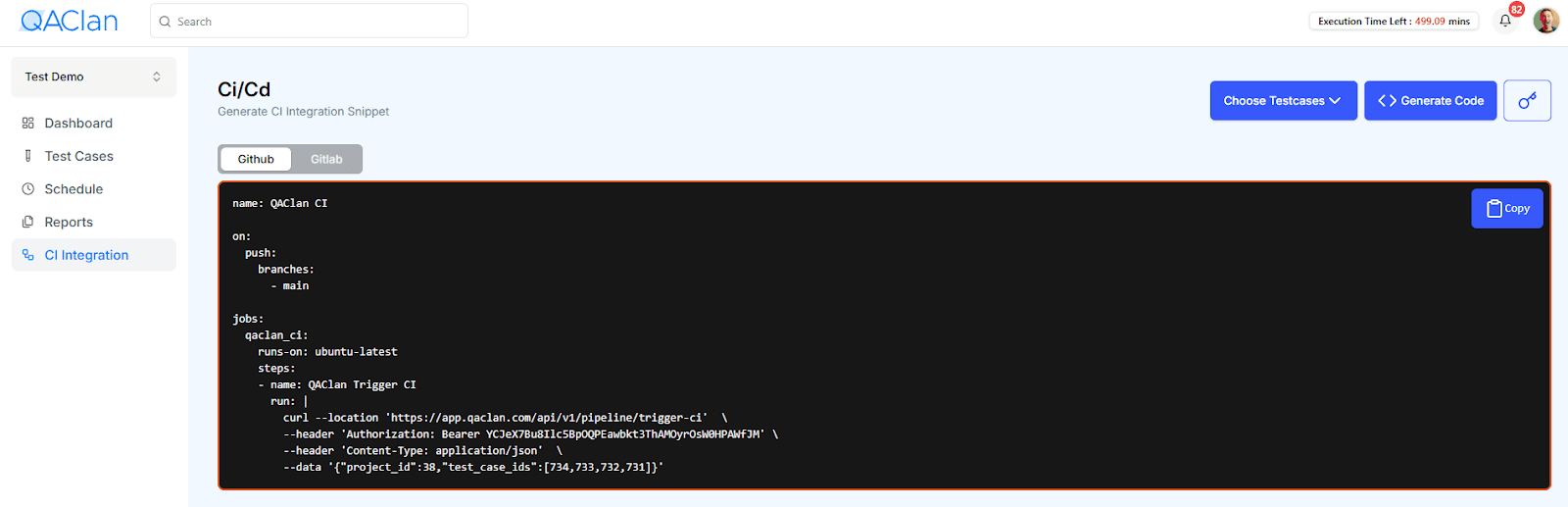
By integrating QAClan into your CI/CD workflow, you can automate test execution, streamline development, and ensure software stability across all releases.